
This page was translated automatically using artificial intelligence (DeepL). The German version is binding. More information about automatic translation

Terms of Use
The following generally applies to electronic publishing services:
- Students and members of Mittweida University of Applied Sciences, as well as registered external users of the HSB, are authorised users
- Authorised users may save data and make paper copies for their own, non-commercial use
- Access is controlled via IP address or username/password
- Systematic downloading of full texts is prohibited
- Distribution to third parties is not permitted in either electronic or printed form
Please observe the respective terms of use of the publisher and the editor.

Access options
For members of the university community, full-text access to licensed electronic resources (e-books, databases, etc.) is available:
- on campus (via the ‘eduroam’ Wi-Fi network or from a PC at the HSB)
- via Shibboleth (institutional login)
- via the HSMW’s VPN (Virtual Private Network)
Setting up a VPN: instructions (HSMWWiki)
If you have any questions about setting up the VPN, please contact the NCC Helpdesk.
For non-university members (external users):
- Members of other universities and research institutions can generally access licensed electronic resources at the HSB using their own institutional login details via eduroam.
- For other non-university members, full-text access to licensed electronic resources is available exclusively from a pool PC in the HSB. Please speak to the staff at the service desk for assistance.
Our digital services
E-books
Primo Search Portal
You can use our library catalogue, the Primo search portal, to search for e-books as well as printed books.
Licensed e-book collections
The HSB acquires numerous e-book packages from various publishers and makes licensed e-book titles available to users.
Licensed e-book titles are available on the following publishers’ portals, amongst others:
- De Gruyter Brill
- Kohlhammer eLibrary
- Beltz (Content-Select)
- Inlibra (formerly Nomos eLibrary, Beck eLibrary)
- Hanser eLibrary
- Springer Link
- utb-studi-e-book
Please note:
- Some e-books may be displayed on the publishers’ portals even though they are not available, as not all e-book packages have been purchased.
- Some titles are available outside the publishers’ websites (e.g. via EBSCO, EBook Central). To search for literature, use the Primo search portal.
Also: LibKey helps you access available full-text content quickly and easily. For further information, click on “LibKey (Search Tools)” above.
Open-access books
You can find freely available, quality-assured open-access books (freely accessible books) in the following online catalogues:
You can also find open-access books in the Primo search portal, marked with the ‘Open Access’ label.
Acquisition proposal
You can submit requests for e-books directly to the acquisitions team.
E-journals / Online journals
EZB (Electronic Journals Library)
The EZB is available to help you search for academic journals.
The EZB is a service for accessing academic electronic full-text journals and comprises academic journal titles (including purely online journals) across all subject areas. It offers fast, structured and standardised access to digital journals.
EZB (Electronic Journals Library)
In the EZB, access options for full-text articles are indicated by traffic light colours (green/yellow/red):
- green = freely accessible
- yellow = available to members of the HSMW
- yellow-red = accessible only for some of the published volumes
- red = not accessible (not licensed)
Primo Search Portal
You can search for licensed electronic journals and articles via our library catalogue, the Primo Search Portal.
LibKey.io: Quick search via DOI/PubMed ID
Do you already have a DOI or PubMed ID (PMID) for the article you’re looking for, but aren’t sure whether it’s available at HSB?
With LibKey.io, you can search for articles directly using a DOI or PubMed ID. As soon as you enter your search terms, the search engine will show you the available options for accessing the full text – you can access the full text in just two clicks!
Select Mittweida University of Applied Sciences as your institution.
Publishing portals / specialist databases for articles
- Content Select (Beltz etc.)
- De Gruyter Brill
- Hogrefe eContent (Hogrefe Psyjournals)
- IEEE Xplore
- Inlibra (formerly Nomos eLibrary)
- ScienceDirect (Elsevier)
- Scientific.Net (Trans Tech Publications)
- Springer Nature Link (formerly SpringerLink)
- Wiley Online Library
Please note:
- Some online journals or articles may be displayed on the publishers’ portals even though they are not available, as not all titles have been purchased.
- Some titles are available outside the publishers’ websites (e.g. via EBSCO). To search for literature, use the Primo search portal.
Also: LibKey helps you access available full-text articles quickly and easily. For further information, click on “LibKey (Search Tools)” above.
Databases
DBIS (Database Information System)
DBIS is available to help you search for databases. It comprises more than 14,000 academic databases across all subject areas and provides an overview of both freely accessible academic databases and those licensed by the HSB.
It provides direct access to the available databases. The listed databases can be sorted by subject area or alphabetically.
DBIS (Database Information System)
In DBIS, the availability of databases is indicated by different traffic light colours (green/yellow/red):
- green = freely available
- yellow = licensed/available at the HSB
- red = not available (not licensed)
Top databases at the HSB
- Beck Online
: Registration is required to use Beck Online. > Registration guide - BrowZine
- EBSCO
- IEEE Xplore
- Nautos
- Römpp Online
- Scientific.Net
- Statista
From 2026, access to content on Statista will only be possible via Shibboleth. To log in, first click on ‘Login’ on the homepage and then on ‘Campus Access’. On the page you are redirected to, select ‘Mittweida University of Applied Sciences’. - Ullmann’s Encyclopedia of Industrial Chemistry
Information on using Beck Online
Access to the licensed content on Beck Online is available via personal login. A VPN connection is essential.
If you do not yet have a user account, please enable your VPN and register on the following website using your university email address: https://beck-online.beck.de/Registration. Please click on the confirmation link in the email you will receive from Beck as soon as possible. Your account will then be confirmed.
You can now use your personal login to access the service from any of the university’s IP addresses and via VPN.
Further information (German/English) can be found here: Beck-Online
Help If you have any questions or encounter any problems, please contact: hsb-service(at)hs-mittweida.de
LibKey (Search tools)
HSB has a licence for the LibKey research tools (provider: Third Iron). With LibKey, you can, for example, use a browser extension to gain quick and easy access to electronic resources, including e-books and online journal articles.
To use the search tools, you will usually need to be connected to the campus network or via VPN.
Find out about four LibKey tools and features here:
- LibKey Nomad (browser extension)
- LibKey.io (search engine with DOI/PMID)
- BrowZine (virtual bookshelf for online journals)
- LibKey @Primo (direct access to full text)
1. LibKey Nomad
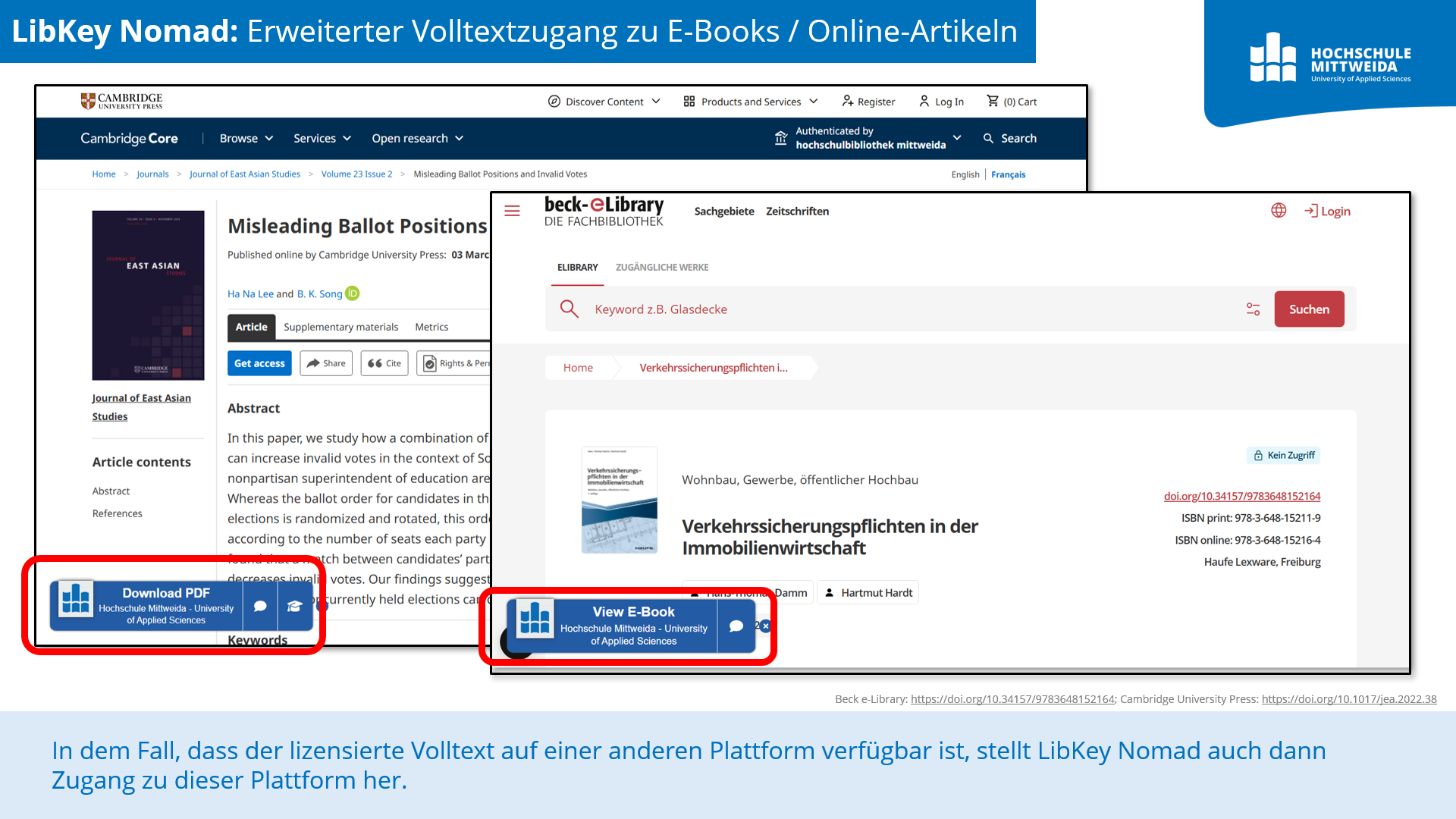
LibKey Nomad is an extension for all popular web browsers such as Chrome, Safari, Firefox, Edge, etc. LibKey Nomad gives you quick access to academic articles or e-books – with just one click!
LibKey Nomad works not only on publishers’ websites, but also on online platforms such as Amazon or Google Books. Other special features include:
If the licensed full text is available on a different platform, LibKey Nomad will then provide access to that platform!
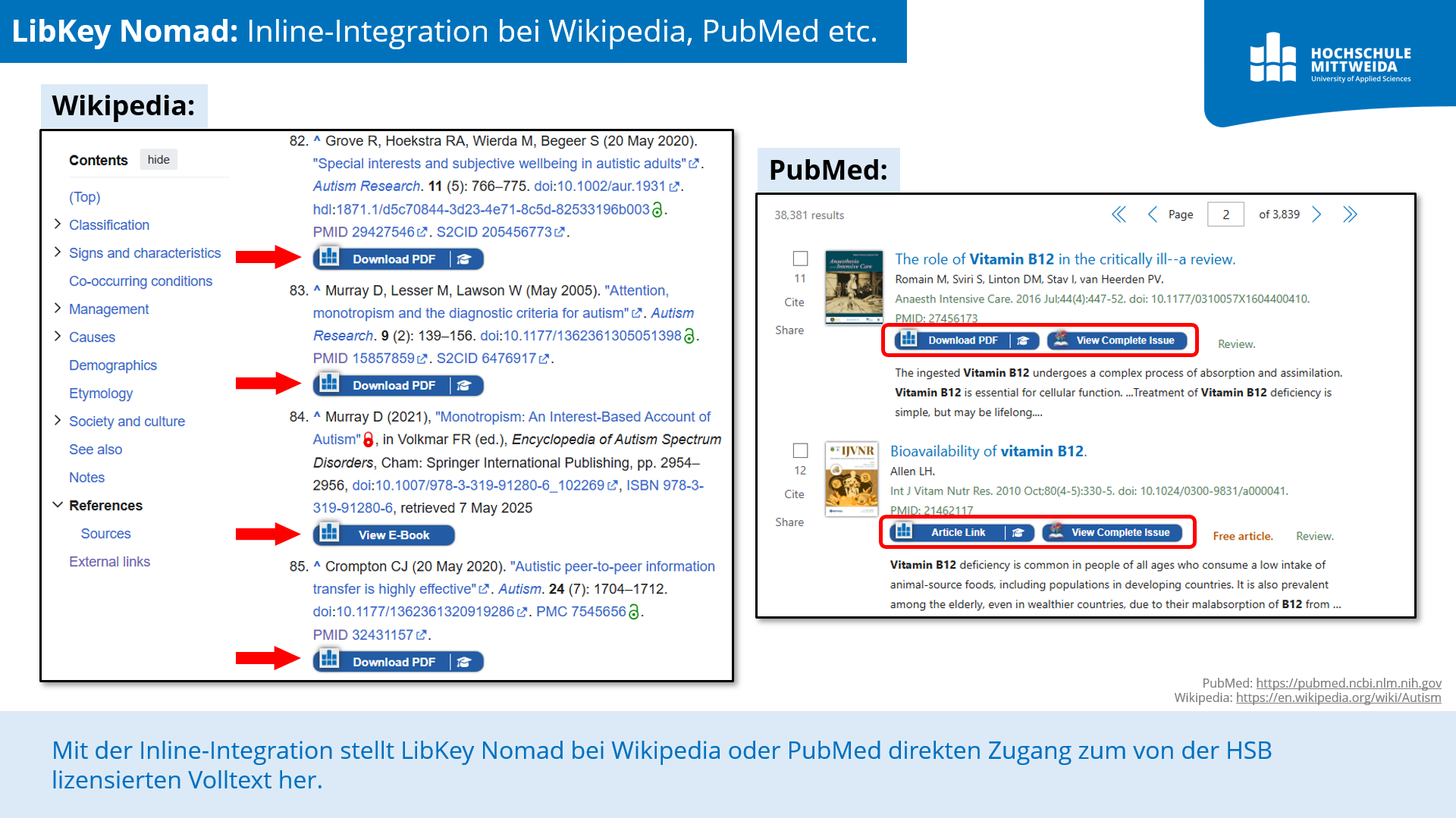
When accessing Wikipedia and PubMed, you will find direct access to the full text licensed by the HSB (‘inline integration’).
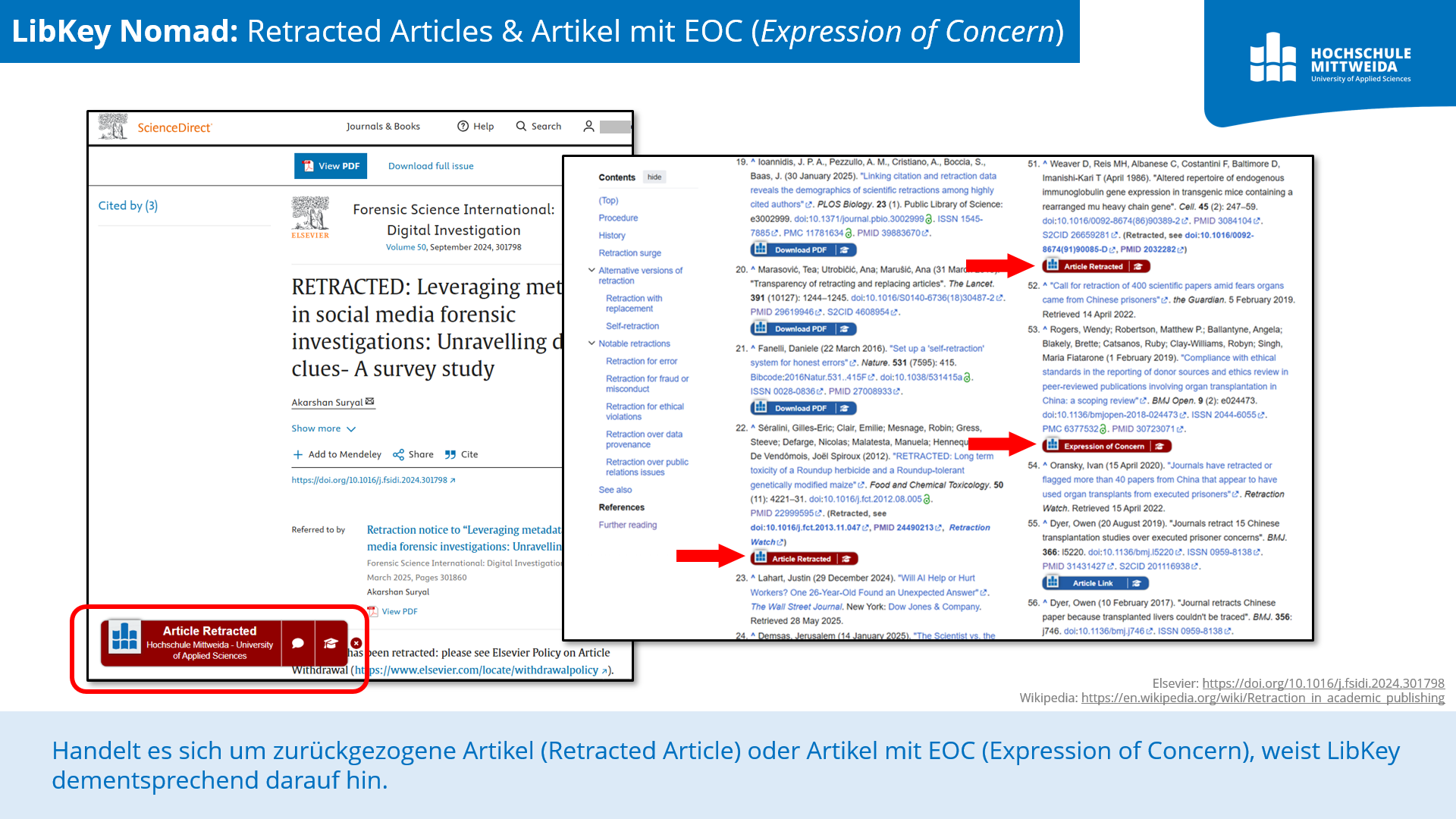
In the case of retracted articles or articles with an EOC (Expression of Concern), LibKey Nomad will indicate this accordingly.
Installing LibKey Nomad
To use LibKey Nomad, first install the ‘LibKey Nomad’ extension in your browser and select ‘Mittweida University of Applied Sciences’ as your organisation. LibKey Nomad will then be ready to use straight away!
If the title you are looking for does not appear to be available with us, you can still search our Primo search portal; you may find it in printed form in our collection.
2. LibKey.io
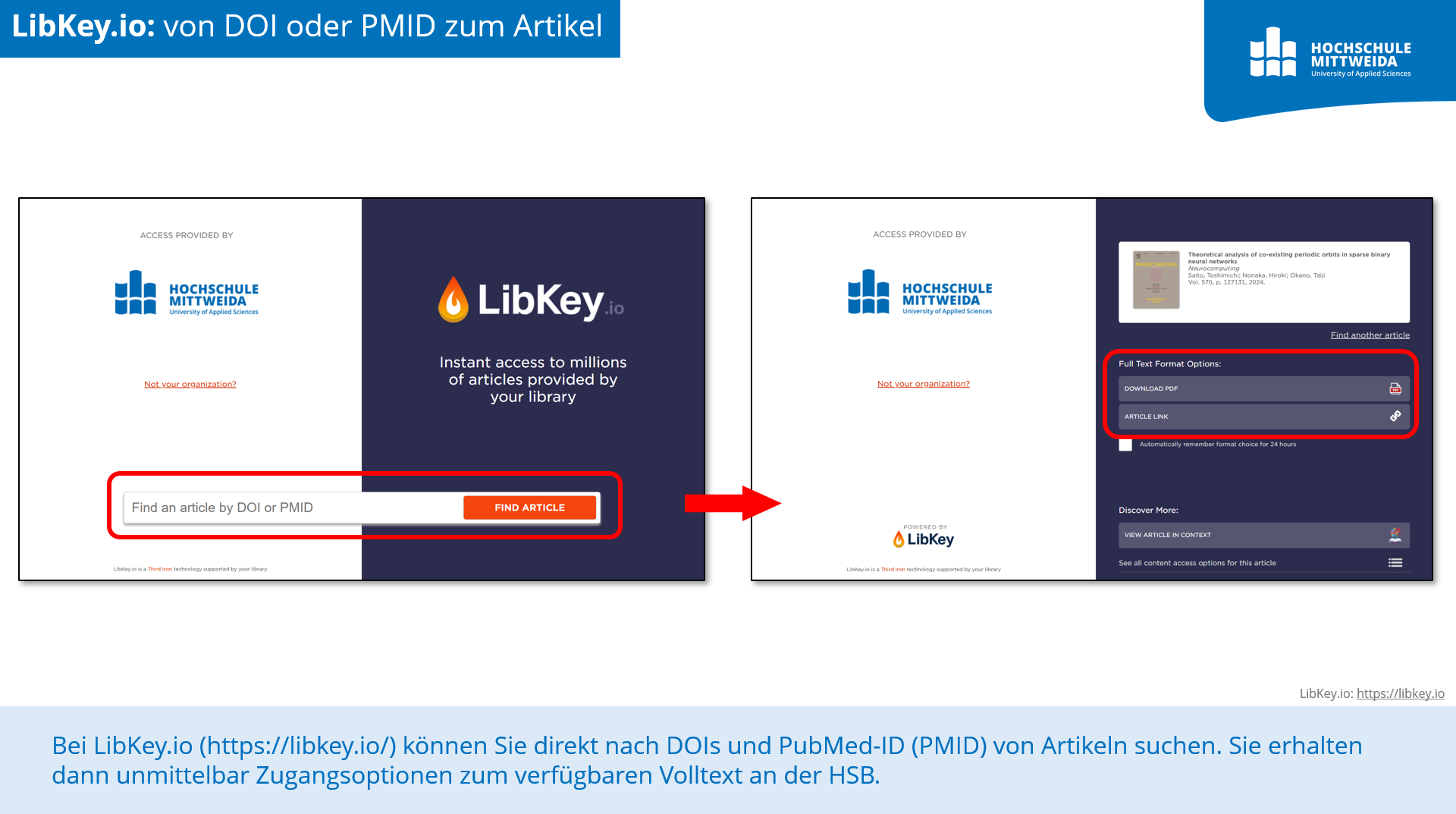
On LibKey.io, you can search directly for the DOIs and PubMed IDs (PMIDs) of articles. You will then immediately be shown access options for the full text available at the HSB.
If an article has been retracted or is subject to an Expression of Concern (EOC), LibKey.io will indicate this.
To use the service, please select Mittweida University of Applied Sciences as your institution.
3. BrowZine
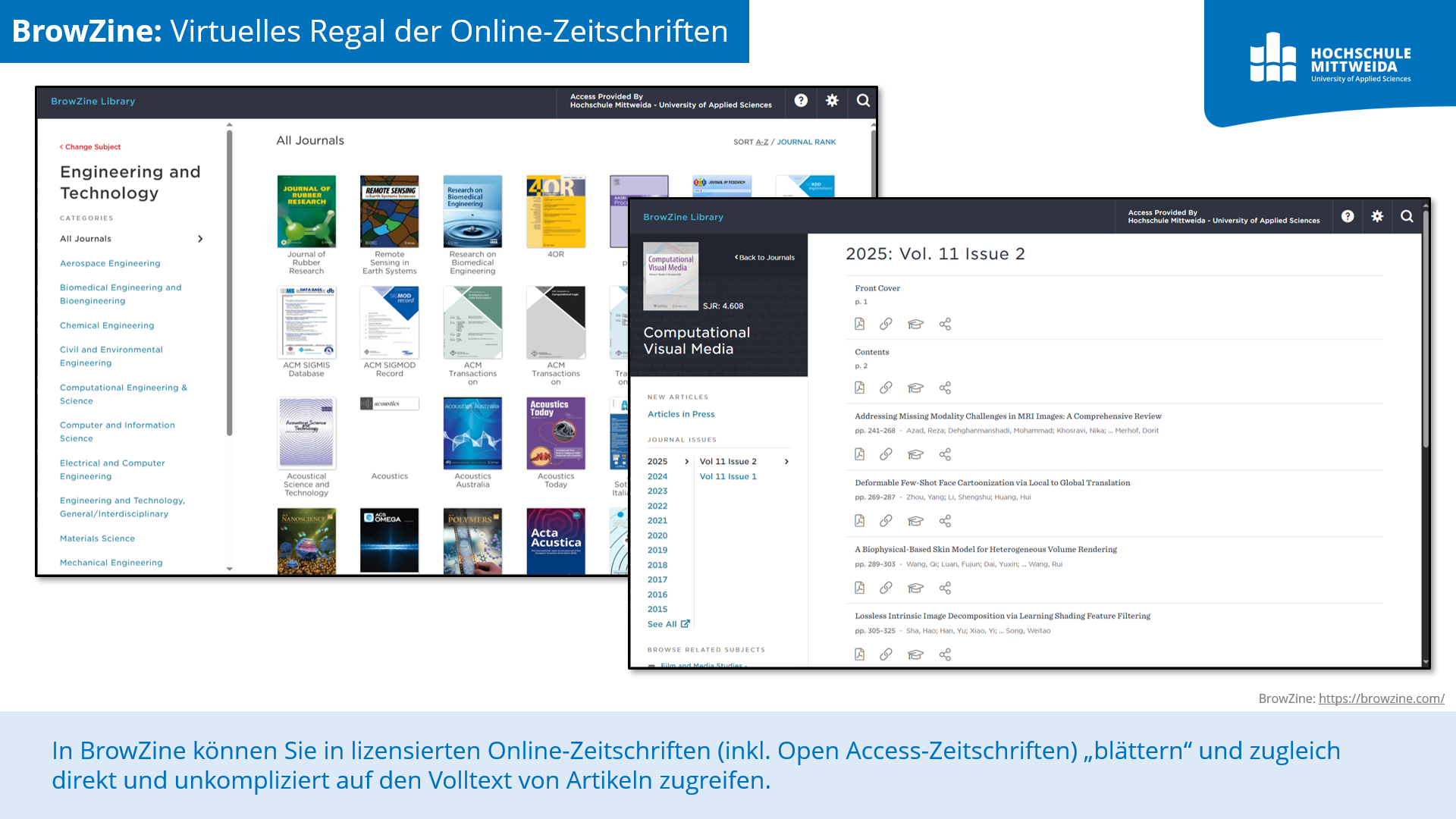
With BrowZine, you can ‘browse’ through online journals licensed by the HSB whilst also accessing the full text of articles directly and easily. Journals are listed by subject area/discipline, regardless of publisher, and articles are listed by volume and issue.
You can also search by journal title or ISSN here.
BrowZine is available to HSMW members both via a web browser and as an app.
MOnAMi
MOnAMi (Mittweida Multimedia Online Archive) is the academic publications server of Mittweida University of Applied Sciences.
The archive contains, amongst other things, academic publications (including final-year projects), scholarly articles, monographs and presentation slides produced by members of the Mittweida University of Applied Sciences.
Note on final theses:
Final theses are only published on MOnAMi if the author and the first examiner have consented to their publication.
- The theses published on MOnAMi are either freely accessible or can be viewed within the HSB/HSMW (or via VPN).
- Some theses up to 2021 are available in printed form at the HSB. These can be reserved via the Primo search portal for viewing.
- For users of other libraries: Theses available for loan in printed form can be ordered via interlibrary loan. Please contact your library to place an order.
Are you looking for publications by HSMW researchers? In VIVO, the HSMW’s Research Information System (FIS), you will find a comprehensive overview of the HSMW’s publications and research activities.
VIVO (Mittweida University of Applied Sciences Research Information System)
VIVO is managed by the Research Department.
Other research portals
Here you will find further useful research and e-learning portals that are freely accessible to everyone (no campus network or VPN connection required):